

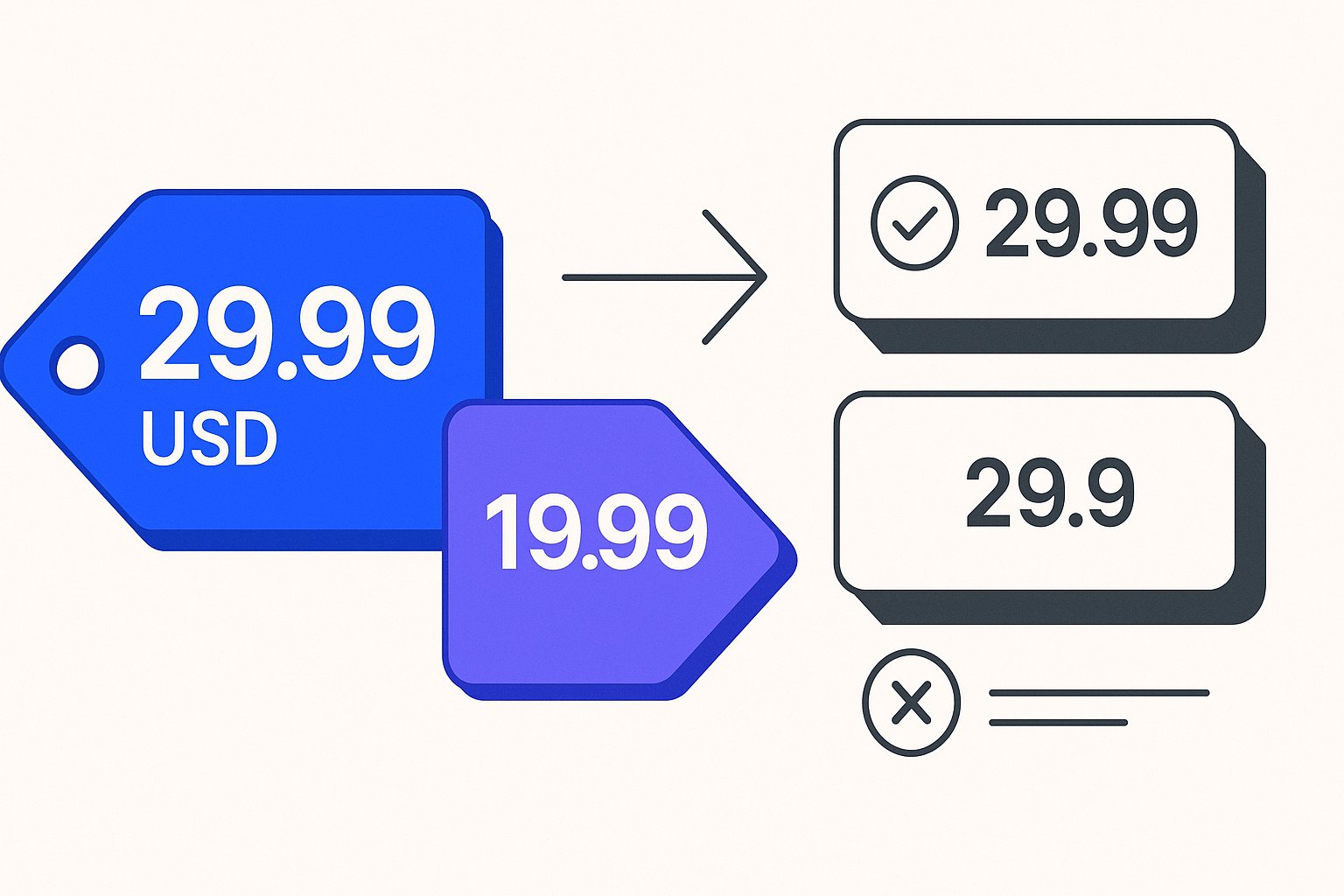
Getting price data right in a Merchant Center feed is one of the fastest ways to avoid product disapprovals. Both the price and sale_price attributes follow specific formatting, currency and landing-page rules. Miss any of them and Merchant Center will disapprove the affected products and flag the issue in your account. This article covers the exact requirements for both attributes so you can map them correctly before your next feed submission.
How to Format the price and sale_price Values
Both attributes share the same core format: a number followed by a space and then an ISO 4217 currency code. There is no flexibility on this structure.
Number format
- Use a period (
.) as the decimal separator. - Submit no more than two digits after the decimal. Google documentation states: "Don't provide more than 2 digits after a decimal. If you include more than 2 digits after the decimal, they're automatically rounded to the nearest acceptable value. For example, 1.0234 is rounded to 1.02 and 29.8999 is rounded to 29.90."
- Values with more than two decimal places are rounded automatically, but the best practice is to submit the already-rounded value to avoid ambiguity.
Currency code
- Always use ISO 4217 three-letter codes:
USD,EUR,GBP, and so on. - Place the code after the number with a single space:
15.00 USD. - The currency must match the target country of your feed, not just where your business is registered.
File format examples
| Data source type | Correct format |
|---|---|
| Text (TSV or CSV) | 15.00 USD |
| XML | <g:sale_price>15.00 USD</g:sale_price> |
These formats apply to both price and sale_price. The attribute type for both is "Number plus currency (use ISO 4217)" and neither is a repeated field.
Minimum Requirements That Prevent Disapproval
Formatting the number correctly is necessary but not sufficient. Both attributes carry landing-page consistency requirements that Merchant Center enforces.
For sale_price specifically, Google documentation requires you to:
- Submit a value that matches the price shown on your landing page and at checkout.
- Continue submitting the full non-sale price in the
priceattribute alongsidesale_price. If you are running a sale but only submit one price field, that value must go inprice, notsale_price. - Ensure the sale price is less than the price attribute value. A
sale_priceequal to or greater thanpricedoes not satisfy the requirement. - "Clearly display both non-sale and sale prices on your landing pages, and only the sale price at checkout."
- Not use
sale_pricefor loyalty prices in countries where the loyalty program attribute is supported. Use theloyalty_programattribute instead.
For the sale date window, the companion attribute sale_price_effective_date controls when the sale price is active. Google documentation specifies that the date range must use ISO 8601 format: YYYY-MM-DDThh:mm[±hhmm] or YYYY-MM-DDThh:mmZ, with a start date and end date separated by a slash (/). The field accepts 0–51 characters. If you omit sale_price_effective_date, the sale price becomes active immediately and remains active until you remove it from the feed.
One timing detail worth noting: "If you don't include a timezone, we default to the UTC timezone." If your sale ends at midnight local time but your server submits without a timezone offset, the effective end will be interpreted as UTC midnight, which may be hours earlier or later than intended depending on your market.
A Hypothetical Example: Apparel Variants on Sale
The following is a hypothetical example illustrating correct attribute mapping. Product names, prices and IDs are invented for illustration only.
Imagine a merchant selling a jacket in two colors. The blue variant is going on sale; the red is not. Here is how the feed rows should look:
Blue jacket — on sale
| Attribute | Value |
|---|---|
id | JACKET-001-BLU |
item_group_id | JACKET-001 |
title | Horizon Jacket - Blue - M |
price | 89.99 USD |
sale_price | 64.99 USD |
sale_price_effective_date | 2026-10-01T00:00-0500/2026-10-15T23:59-0500 |
color | Blue |
size | M |
Red jacket — not on sale
| Attribute | Value |
|---|---|
id | JACKET-001-RED |
item_group_id | JACKET-001 |
title | Horizon Jacket - Red - M |
price | 89.99 USD |
color | Red |
size | M |
Notice that the red variant has no sale_price row at all — omitting the attribute is correct when there is no active sale. On the blue variant, both price (full price) and sale_price (reduced price) are submitted, and the sale_price_effective_date includes a timezone offset (-0500) so there is no ambiguity about when the sale ends. The decimal values are already at two digits, so no rounding will occur.
If the landing page for the blue jacket showed $89.99 only — without the sale price — Merchant Center would detect a mismatch and disapprove that item. Both prices must be visible on the product page.
Common Mapping Mistakes to Check in Your Feed
Missing currency code. Submitting 64.99 without USD (or the relevant ISO 4217 code) is invalid. The attribute requires the number-plus-currency format; the currency is not inferred from your account settings.
Wrong decimal separator. Some export pipelines use a comma as a decimal separator in European locales. 64,99 EUR will not be parsed correctly. Always use a period: 64.99 EUR.
sale_price higher than or equal to price. If your mapping logic pulls both prices from the same source field during a configuration error, sale_price could end up matching price. This fails the requirement that the sale price must be less than the regular price.
Loyalty prices in sale_price. If you operate a loyalty or membership programme in a supported country, do not use sale_price to reflect member-only pricing. That use case requires the loyalty_program attribute.
No effective date on a time-limited promotion. Without sale_price_effective_date, the sale price goes live immediately and stays live indefinitely. Set the date range so the feed reflects your actual promotion window.
Physical Goods Subscriptions. The sale_price attribute is not supported for Physical Goods Subscriptions. Use subscription_cost instead.
Managing these mappings consistently across a large catalog — especially when variants have different sale windows — is where feed management tooling earns its keep. Magicfeedpro is built to handle attribute-level mapping for destination feeds like Merchant Center, so teams can apply and schedule price overrides at the variant level without editing the feed file by hand.
For a broader look at disapprovals related to product data, see the Google Merchant Center Errors: 12 Common Fixes article on the Magicfeedpro blog.
Related articles
Tax Attribute in Google Shopping Feeds: Format and When to Submit
Learn when to include the tax attribute in your product feed and how to format country, region, rate, and tax_ship sub-attributes correctly.
identifier_exists False: What to Submit and When It Backfires
When to set identifier_exists to false in your product feed, what companion attributes you still need, and what causes its own disapproval.
MPN Attribute in Product Feeds: Rules When There Is No GTIN
Learn when the mpn attribute is required, how to format it correctly, and what to submit when a product has no GTIN.