

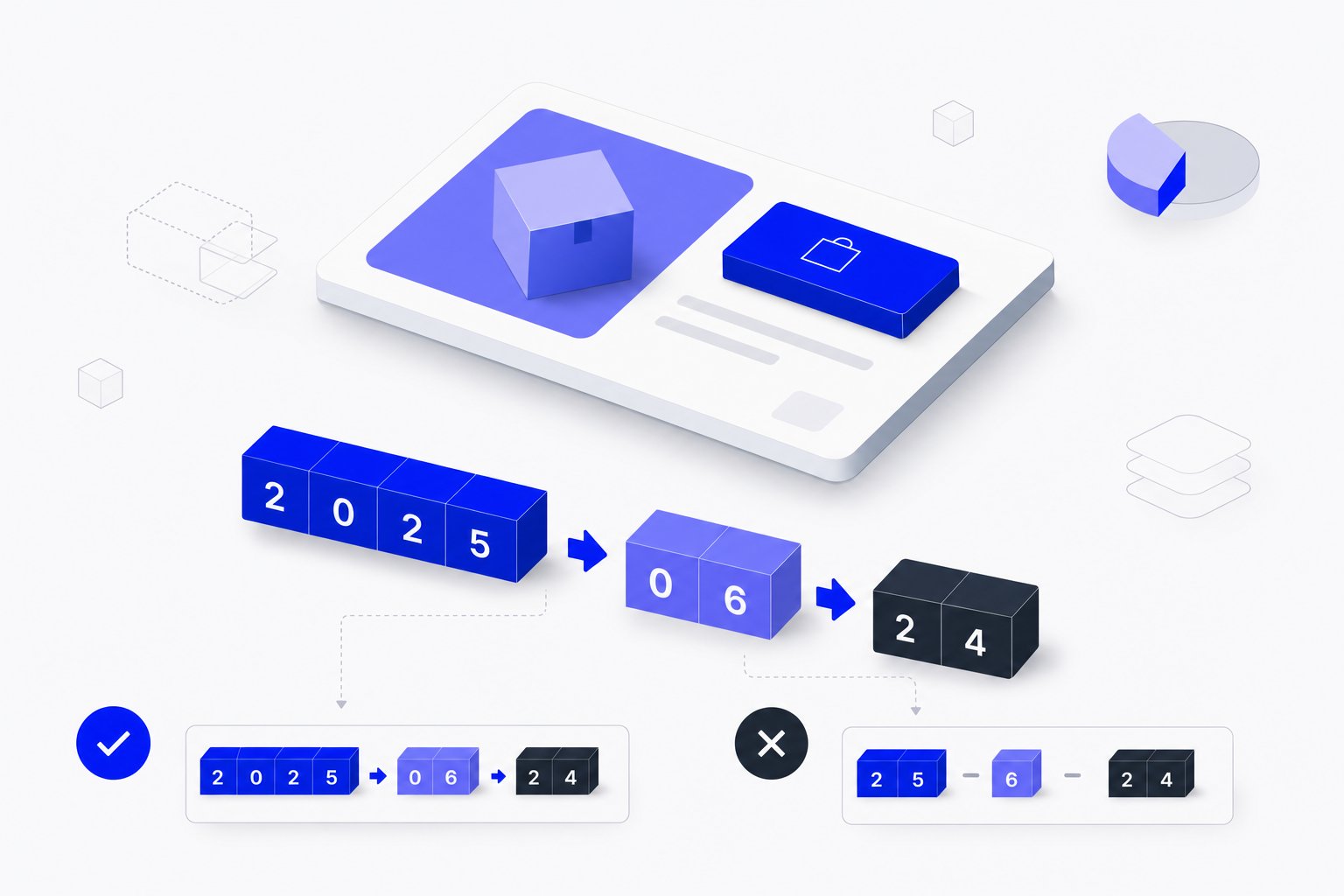
The availability_date attribute is one of the more misunderstood fields in a Shopping feed. Many merchants submit it inconsistently, omit it when it is actually required, or use a format that Merchant Center cannot parse. This guide covers exactly when the attribute is mandatory, what the ISO 8601 format looks like in practice, and what happens when things go wrong.
When Is availability_date Required?
The attribute has a conditional status: it is optional by default, but becomes required as soon as you set the availability attribute to preorder or backorder. Google documentation states the attribute is "Required if you set the availability [availability] attribute to preorder or backorder."
Understanding the distinction between those two availability values matters. Google documentation defines them separately: preorder applies when "you're accepting orders for this product, but it's not been released for sale," while backorder applies when "the product isn't available at the moment, but you're accepting orders and it will be shipped when it's available again." Neither value is a substitute for the other. If an existing product sells out and you are still taking orders, use backorder. If a brand-new product has not launched yet, use preorder.
For in_stock and out_of_stock products, the availability_date attribute is not required and Google will not use it to decide eligibility.
Exact Format Requirements
The attribute must follow ISO 8601. The accepted patterns are YYYY-MM-DDThh:mm[±hhmm] or YYYY-MM-DDThh:mmZ. Google documentation specifies a character limit of 1–25 characters, and the field cannot be repeated on the same item.
Here is what a correctly formatted value looks like in each data source type:
| Source type | Example value |
|---|---|
| Text (TSV or CSV) | 2024-09-15T10:00-0500 |
| XML | <g:availability_date>2024-09-15T10:00-0500</g:availability_date> |
Omitting the time and timezone is technically accepted by the spec, but Google documentation warns that if you do not specify them, "the default time is 12 AM, midnight, in the UTC timezone." That default is rarely what you intend. A product that ships at 10 a.m. Central US time should carry -0500 or -0600 depending on daylight saving, not an implied UTC midnight.
Date ranges are explicitly not allowed. Submit a single point in time. The date can be up to one year in the future from the date of submission.
Landing Page Matching and Disapproval Risks
Formatting the feed value correctly is only half the requirement. Google documentation states that "the availability date should also be added to the product's landing page and be clear to your customers (for example, 'May 6, 2023')."
If an exact date is not yet confirmed, an estimated month is acceptable on the landing page (for example, "May 2023"). The important thing is that the page and the feed are consistent. A feed showing a preorder date that the landing page does not mention creates a mismatch that can cause a disapproval or a policy flag.
For preorder and backorder items specifically, the landing page "must display the expected shipping date" according to Google documentation. This is a minimum landing page requirement, not a recommendation.
Note that there are no minimum requirements listed for the availability_date attribute itself — but that phrasing means the attribute has no additional content rules beyond the formatting spec. It does not mean you can omit it when availability is preorder or backorder, because the conditional requirement already covers that case.
Hypothetical Example: A Pre-Launch Gaming Headset
The following is a hypothetical example for illustration purposes only.
Imagine a retailer adding a gaming headset to their catalog before its release date. They set availability to preorder and want to show a ship date of 25 March 2025 at 9 a.m. Eastern Standard Time (UTC−5).
Their TSV feed row for the relevant attributes would look like this:
availability: preorder
availability_date: 2025-03-25T09:00-0500
Their XML feed would contain:
<g:availability>preorder</g:availability>
<g:availability_date>2025-03-25T09:00-0500</g:availability_date>
The landing page would display text such as "Ships 25 March 2025" or "Expected dispatch: March 2025" if the exact date is not yet confirmed.
If the retailer submits the value as 2025-03-25 only (no time, no timezone), Merchant Center will interpret it as 2025-03-25T00:00Z, which is midnight UTC — likely several hours earlier than intended, and potentially a different calendar day in the customer's local timezone.
If the retailer omits availability_date entirely while availability is preorder, the product risks disapproval. When the launch date is confirmed, the retailer should update the feed value and the landing page at the same time to keep them in sync.
Keeping the Value Up to Date
Google recommends adding an estimated date as soon as a product goes into preorder or backorder status and updating the value as soon as the confirmed ship date is known. Because the attribute accepts dates up to one year ahead, you have room to publish an approximate value early and refine it later.
In practice, managing this across a large catalog — especially when supplier lead times change — means your feed pipeline needs to push updates reliably. Tools like Magicfeedpro are built around maintaining accurate destination feeds so that conditional attributes like availability_date stay in sync with your actual stock and logistics data, rather than drifting from a stale export.
If you are tracking down other Merchant Center disapprovals beyond availability issues, the Google Merchant Center Errors: 12 Common Fixes article covers a broader set of diagnostics that commonly appear alongside availability mismatches.
Quick Reference Checklist
Before submitting a preorder or backorder product to your feed, verify each of the following:
availabilityis set topreorderorbackorder(notout_of_stock)availability_dateis present and followsYYYY-MM-DDThh:mm[±hhmm]orYYYY-MM-DDThh:mmZ- The value is a single date, not a range
- The date is no more than one year in the future
- The landing page displays the expected shipping date visibly to the customer
- The feed value and landing page date are consistent
- The timezone offset matches the merchant's intended dispatch timezone
Any one of these points failing can prevent the product from showing or trigger a disapproval notice in Merchant Center.
Related articles
size_type in Google Shopping Feeds: Values, Format and Rules
Learn when size_type is required, what values it accepts, and how it works with the size attribute to prevent apparel disapprovals.
age_group in Google Shopping Feeds: Values, Rules and Variants
Learn which age_group values Google accepts, when submission is required, and how it works with item_group_id for apparel variants.
Shipping Attribute in Google Shopping Feeds: Format and Rules
Learn the exact sub-attributes, mandatory conditions, and formatting rules for the shipping attribute in Google Shopping product feeds.