

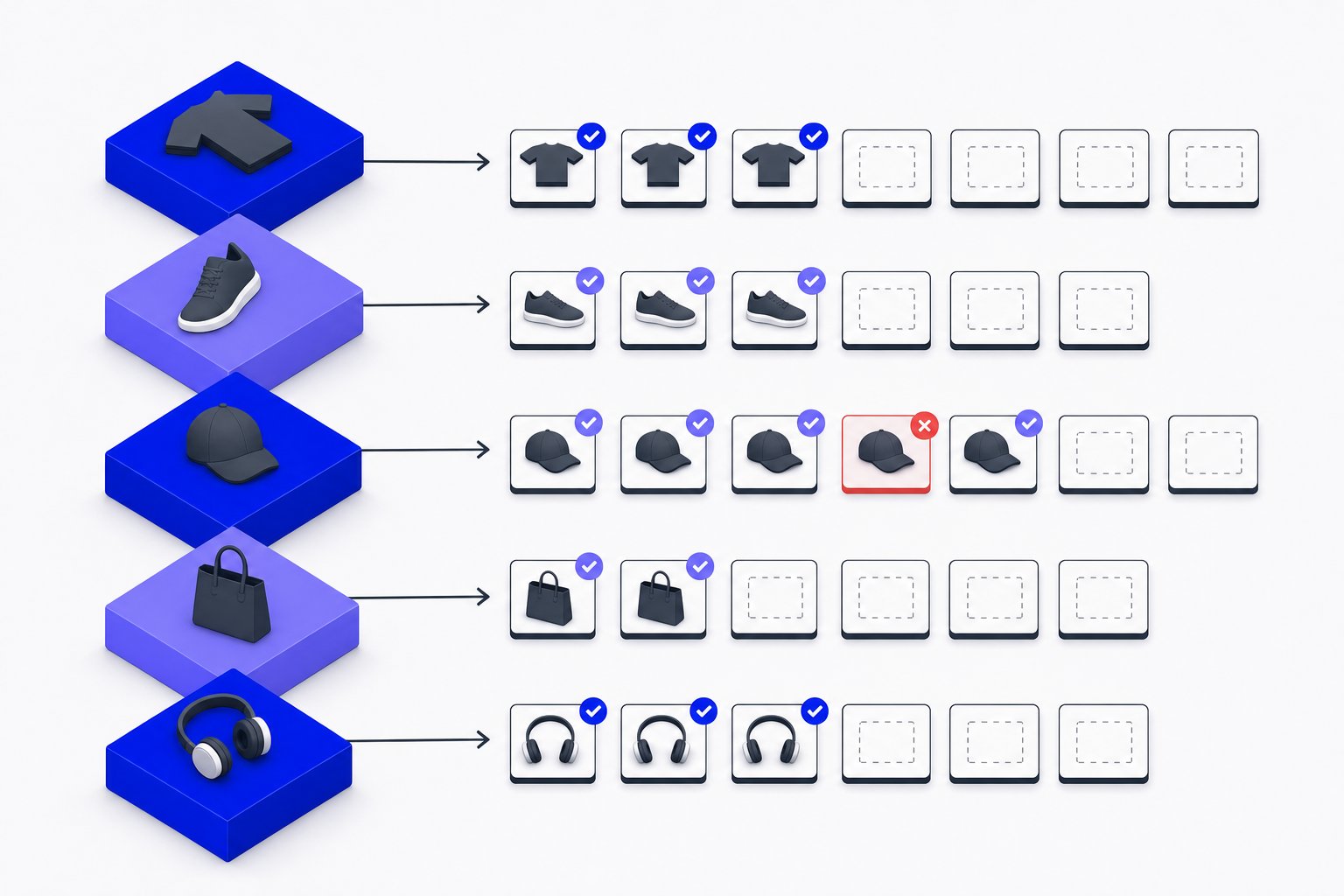
When a product comes in multiple colors or sizes, each variant is a separate row in your feed — and each row can carry its own set of supplemental images. Done correctly, this gives shoppers the right visual for the exact SKU they are considering. Done incorrectly, every color variant shows the same hero shot, which creates confusion and can suppress engagement.
This article focuses specifically on additional_image_link at the variant level: the format rules, the per-SKU image limits, the grouping requirement, and common mapping mistakes to avoid.
Why Each Variant Needs Its Own additional_image_link Values
In a Google Shopping feed, variants are submitted as individual products that share a common item_group_id. Google documentation states that you must "Submit each variant as a separate product" and "submit the same value for the item group ID attribute for each to indicate that these are variants of the same product."
Because each variant is a separate product row, the image_link and additional_image_link attributes on that row describe only that SKU. A red hoodie row should carry image URLs of the red hoodie — not the blue one. If your feed tool merges all variant images into a single row, or copies the parent product's gallery to every child, you lose the per-color visual differentiation that shoppers expect.
The item_group_id value must be identical across all variants of the same product. Google documentation is explicit: "Use the same value for the item group ID [item_group_id] attribute for all variants of the same product." The ID itself can be up to 50 characters and should contain only alphanumeric characters, underscores, or dashes. Do not rely on casing to distinguish groups — the values hoodie123 and HOODIE123 are treated as the same group.
Format Rules and Limits for additional_image_link
Google documentation specifies that additional_image_link accepts URLs using http or https, ASCII characters only, and must be RFC 3986 compliant. Each URL can be up to 2,000 characters. Supported file formats are JPEG, WebP, PNG, GIF, BMP, and TIFF, and the file extension must match the actual format.
The attribute is a repeated field: Google documentation states you can "Include up to 10 additional images" per product. For a text-format feed, submit multiple URLs separated by commas. If any individual URL itself contains a comma, encode that comma as %2C within the URL, but use an unencoded comma as the separator between URLs. For XML feeds, repeat the <g:additional_image_link> tag for each URL — do not concatenate them in one tag.
Text feed example (comma-separated):
https://www.example.com/red-hoodie-angle2.jpg,https://www.example.com/red-hoodie-flat.jpg
XML feed example (repeated tag):
<g:additional_image_link>https://www.example.com/red-hoodie-angle2.jpg</g:additional_image_link>
<g:additional_image_link>https://www.example.com/red-hoodie-flat.jpg</g:additional_image_link>
Image size matters for display eligibility. Google's current minimum is 100 × 100 pixels (500 × 500 for apparel), but Google documentation notes new requirements of "at least 500 x 500 pixels for all products beginning January 31, 2027." To cover all listing formats now and after that date, the recommendation is to supply images at 1,500 × 1,500 pixels or above. Images that fall below the minimum size will not cause a disapproval, but they will not be shown.
If you use generative AI to produce supplemental images, the files must include metadata indicating AI origin. The documentation specifically calls out the IPTC DigitalSourceType metadata tag and states you must not remove it.
Mapping Extra Images per SKU: Hypothetical Example
The following is a hypothetical example to illustrate the mapping pattern. It does not represent a real catalog or measured outcome.
Suppose you sell a canvas tote bag in three colors — Natural, Black, and Navy — each available in one size. Your parent SKU is TOTE-001. You would submit three product rows with item_group_id = TOTE-001.
| id | item_group_id | color | image_link | additional_image_link |
|---|---|---|---|---|
| TOTE-001-NAT | TOTE-001 | Natural | /natural-main.jpg | /natural-strap.jpg,/natural-interior.jpg |
| TOTE-001-BLK | TOTE-001 | Black | /black-main.jpg | /black-strap.jpg,/black-interior.jpg |
| TOTE-001-NVY | TOTE-001 | Navy | /navy-main.jpg | /navy-strap.jpg,/navy-interior.jpg |
Each row's additional_image_link column contains only images of that specific color variant. The strap shot for the Natural bag does not appear on the Black row. If your feed export tool writes the same gallery URLs to every row (a common issue when pulling from a parent product node), you need to override the value at the variant level before the feed is submitted.
Common angles worth including per color variant: a side or back view, a detail shot (clasp, label, texture), and an in-use or lifestyle image. The documentation notes that additional images "are commonly used to show a product from different angles or with product staging elements" and can include lifestyle images. They must not be brand-only logos, blurry, or carry watermarks unrelated to the product.
Common Mapping Mistakes and How to Avoid Them
Reusing the parent gallery for all variants. If your Shopify or WooCommerce store attaches color-specific images at the variant level in its data model, make sure your feed export reads variant-level image nodes, not just the parent product's media gallery. Many default integrations pull parent images only.
Exceeding 10 additional images. The limit is 10 URLs per product row. If your export generates more, the feed may process incorrectly. Trim the list to your best 10 images per SKU before submission.
Comma encoding errors. A URL containing an unencoded comma will be parsed as two separate (broken) URLs. Encode commas inside URLs as %2C and use a plain comma only as the separator between full image URLs.
Unstable item_group_id values. Once assigned, the item_group_id for a variant group should not change. The documentation recommends using "a stable item group ID value for each group of product variants." Changing it causes grouping inconsistency in Merchant Center.
Missing variant-level image_link. The additional_image_link attribute depends on image_link being present and valid for the same row. If the main image for a variant is missing or disapproved, supplemental images for that row are also at risk.
Managing image mappings cleanly across a large catalog with many variant combinations is one of the more tedious parts of feed maintenance. Magicfeedpro is built around reliable per-SKU feed output, which makes it easier to assign the right images to the right variant row without manually editing exports.
Summary of Requirements vs. Recommendations
| Rule | Status |
|---|---|
| Up to 10 additional images per product row | Requirement (hard limit) |
| URL must be ASCII, RFC 3986 compliant, up to 2,000 characters | Requirement |
| Supported formats: JPEG, WebP, PNG, GIF, BMP, TIFF | Requirement |
| Same item_group_id for all variants of one product | Requirement |
| Images at 1,500 × 1,500 pixels or larger | Recommendation |
| Show product from multiple angles, include lifestyle images | Recommendation |
| AI-generated images must retain IPTC metadata | Requirement |
Keeping your per-variant image mapping correct is worth the effort. Shoppers comparing color variants expect to see the actual color they are evaluating, not a generic shot of the product in a different finish.
Related articles
Color Attribute in Product Feeds: Format Rules and Variant Grouping
Exact character limits, multi-value syntax, prohibited terms and how color ties into item_group_id variant grouping.
excluded_destination Feed Attribute: Accepted Values and Format
Control which Google surfaces show your products using excluded_destination and included_destination feed attributes.
product_type vs google_product_category in Your Feed
Understand what each category attribute does, how to format both correctly, and when each one controls bidding.